Examples
Hello World
name: hello world
steps:
  - name: s1
    command: echo hello world
  - name: s2
    command: echo done!
    depends:
      - s1
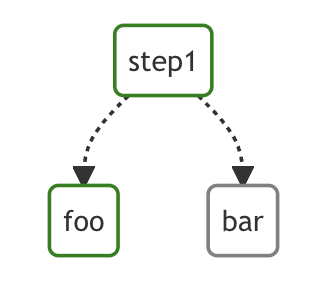
Conditional Steps
params: foo
steps:
  - name: step1
    command: echo start
  - name: foo
    command: echo foo
    depends:
      - step1
    preconditions:
      - condition: "$1"
        expected: foo
  - name: bar
    command: echo bar
    depends:
      - step1
    preconditions:
      - condition: "$1"
        expected: bar
File Output
steps:
  - name: write hello to '/tmp/hello.txt'
    command: echo hello
    stdout: /tmp/hello.txt
Passing Output to Next Step
steps:
  - name: pass 'hello'
    command: echo hello
    output: OUT1
  - name: output 'hello world'
    command: bash
    script: |
      echo $OUT1 world
    depends:
      - pass 'hello'
Running a Docker Container
steps:
  - name: deno_hello_world
    executor:
      type: docker
      config:
        image: "denoland/deno:1.10.3"
        host:
          autoRemove: true
    command: run https://examples.deno.land/hello-world.ts
See Running Docker Containers for more details.
Sending HTTP Requests
steps:
  - name: get fake json data
    executor: http
    command: GET https://jsonplaceholder.typicode.com/comments
    script: |
      {
        "timeout": 10,
        "headers": {},
        "query": {
          "postId": "1"
        },
        "body": ""
Sending a Webhook
steps:
  - name: trigger_deployment_webhook
    executor:
      type: webhook
      config:
        url: "https://example.org/hooks/deploy"
        method: "POST"
        timeout: 10
        headers:
          Authorization: "Bearer ${WEBHOOK_TOKEN}"
          Content-Type: "application/json"
        query:
          env: "prod"
        body: '{"service":"api","version":"1.2.3"}'
        successStatusCodes: [200, 202]
        silent: true
This example is also available as examples/execute_webhook.yaml.
Handler Callbacks with Webhooks
Use lifecycle hooks to notify external systems when a workflow succeeds or fails.
env:
  - CALLBACK_URL: https://example.org/hooks/workflow-status

handlerOn:
  success:
    executor:
      type: webhook
      config:
        url: "${CALLBACK_URL}"
        method: "POST"
        headers:
          Content-Type: "application/json"
        body: '{"status":"COMPLETED"}'
        silent: true
  failure:
    executor:
      type: webhook
      config:
        url: "${CALLBACK_URL}"
        method: "POST"
        headers:
          Content-Type: "application/json"
        body: '{"status":"FAILED"}'
        silent: true

steps:
  - name: check_identity
    command: bash
    script: |
      id
This example is also available as
examples/handler_on_webhook_callback.yaml.
Running Terraform
steps:
  - name: terraform_apply
    executor:
      type: terraform
      config:
        binary: terraform
        workingDir: ./infra
        init: true
        initArgs:
          - -upgrade
        subcommand: apply
        varFiles:
          - env/prod.tfvars
        vars:
          image_tag: "1.2.3"
          region: "us-east-1"
        targets:
          - module.app
        autoApprove: true
        env:
          TF_IN_AUTOMATION: "true"
This example is also available as examples/execute_terraform.yaml.
Running Ansible Playbook
steps:
  - name: run_ansible_playbook
    executor:
      type: ansible
      config:
        binary: ansible-playbook
        playbook: deploy/site.yml
        inventory: inventory/prod.ini
        tags:
          - deploy
          - app
        extraVars:
          image_tag: "1.2.3"
          environment: "prod"
        become: true
        forks: 20
        diff: true
        check: false
        env:
          ANSIBLE_STDOUT_CALLBACK: yaml
- This example is also available as
examples/execute_ansible_playbook.yaml. }
Querying JSON Data with jq
steps:
  - name: run query
    executor: jq
    command: '{(.id): .["10"].b}'
    script: |
      {"id": "sample", "10": {"b": 42}}
Expected Output:
{
    "sample": 42
}
Formatting JSON Data with jq
steps:
  - name: format json
    executor: jq
    script: |
      {"id": "sample", "10": {"b": 42}}
Expected Output:
{
    "10": {
        "b": 42
    },
    "id": "sample"
}
Outputting Raw Values with jq
steps:
  - name: output raw value
    executor:
      type: jq
      config:
        raw: true
    command: '.id'
    script: |
      {"id": "sample", "10": {"b": 42}}
Expected Output:
sample
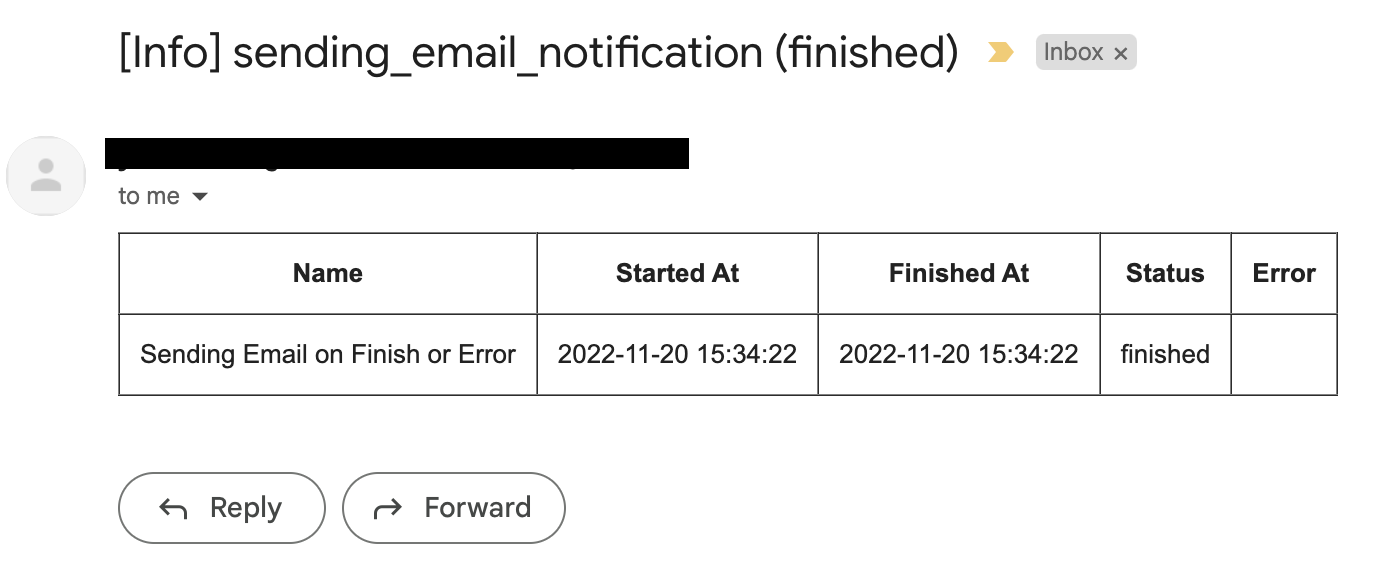
Sending Email Notifications
steps:
  - name: Sending Email on Finish or Error
    command: echo "hello world"

mailOn:
  failure: true
  success: true

smtp:
  host: "smtp.foo.bar"
  port: "587"
  username: "<username>"
  password: "<password>"
errorMail:
  from: "foo@bar.com"
  to: "foo@bar.com"
  prefix: "[Error]"
  attachLogs: true
infoMail:
  from: "foo@bar.com"
  to: "foo@bar.com"
  prefix: "[Info]"
  attachLogs: true
Sending Email
smtp:
  host: "smtp.foo.bar"
  port: "587"
  username: "<username>"
  password: "<password>"

steps:
  - name: step1
    executor:
      type: mail
      config:
        to: <to address>
        from: <from address>
        subject: "Sample Email"
        message: |
          Hello world
Customizing Signal Handling on Stop
steps:
  - name: step1
    command: bash
    script: |
      for s in {1..64}; do trap "echo trap $s" $s; done
      sleep 60
    signalOnStop: "SIGINT"
Importing DAG Files
Use imports to build modular workflows from reusable YAML files.
# examples/imports/main_workflow.yaml
name: import-example
imports:
  - ./common_steps
  - ./notify_steps

steps:
  - name: run_pipeline
    command: echo "running pipeline"
    depends:
      - validate_data
# examples/imports/common_steps.yaml
steps:
  - name: prepare_data
    command: echo "preparing data"
  - name: validate_data
    command: echo "validating data"
    depends:
      - prepare_data
# examples/imports/notify_steps.yaml
steps:
  - name: notify
    command: echo "notifying"
    depends:
      - run_pipeline
Scraping Log Forwarding Metrics
Use this example to scrape Prometheus-formatted log forwarding metrics from the local monitor endpoint.
name: scrape-log-forwarding-metrics

steps:
  - name: scrape_prometheus_metrics
    command: curl
    args:
      - -fsS
      - http://127.0.0.1:8091/log-forwarding/metrics/prometheus
This example is also available as examples/scrape_log_forwarding_metrics.yaml.