Blackdagger Github Infra
Blackdagger GitHub Infra revolutionizes DAST (Dynamic Application Security Testing) by leveraging GitHub Actions runners for enhanced operational security. This guide will walk you through setting up and using the system for your security testing needs.
Why Use GitHub Runners for DAST?
Enhanced OPSEC: Perform scans from GitHub’s trusted infrastructure
Avoid Detection: Reduce likelihood of detection by web defenses
Bypass IP Blocking: Get around IP-based blocking mechanisms
Stealthy Operations: Conduct security testing with minimal digital footprint
Setup Instructions
Step 1: Fork the Repository
Visit the blackdagger-github-infra GitHub repository
Click the “Fork” button in the upper right corner
Wait for the repository to be forked to your account
Step 2: Generate a GitHub Personal Access Token
Go to your GitHub account settings
Navigate to Developer Settings > Personal Access Tokens > Tokens (classic)
Click “Generate new token”
Select the following permissions:
repo (Full control of private repositories)
workflow (Update GitHub Action workflows)
Set an expiration date as needed
Click “Generate token”
Copy the token immediately (you won’t be able to see it again)
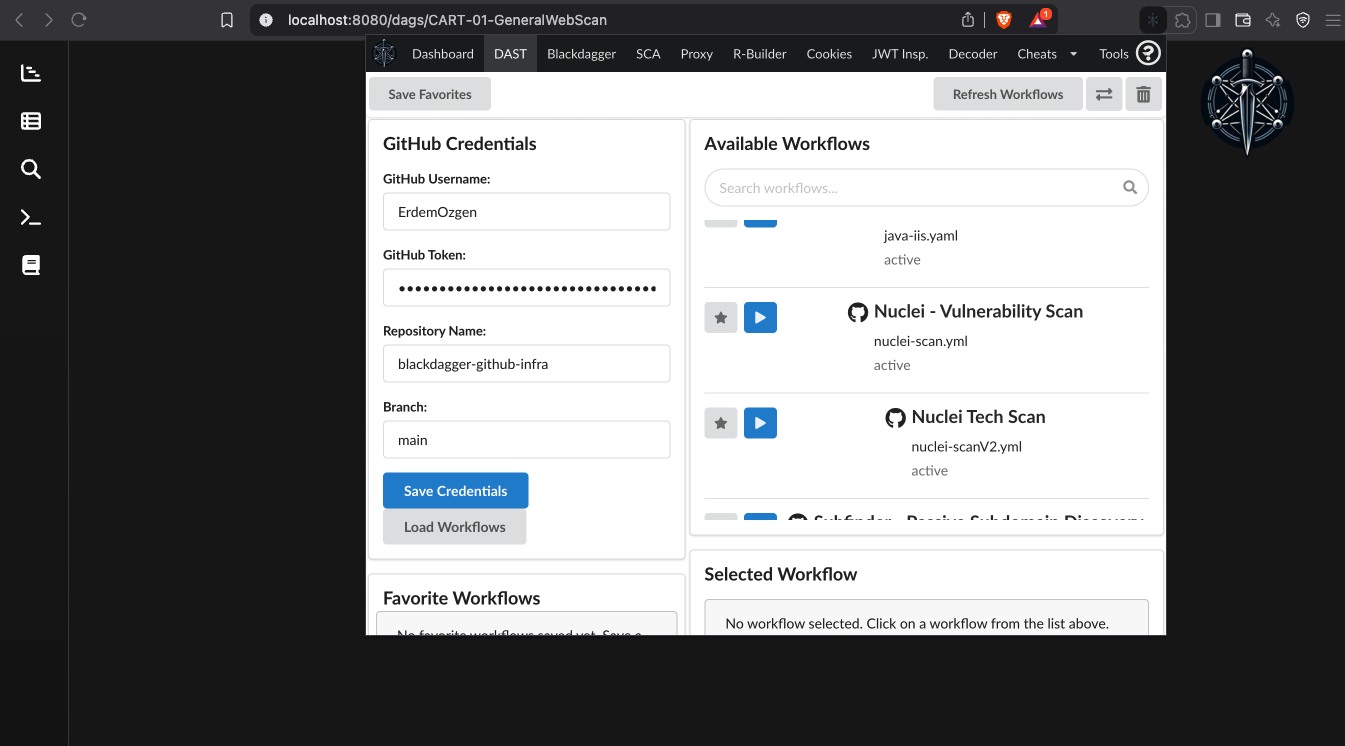
Step 3: Configure Blackdagger Web Kit
Install the Blackdagger Web Kit extension in your browser
Open the Web Kit interface
Navigate to the DAST settings section
Fill in the required fields:
Username: Your GitHub username
Repository Name: Your forked repository name (typically “blackdagger-github-infra”)
GitHub Token: Paste the personal access token you generated
—
Step 4: Launch Security Tests
From the Blackdagger Web Kit interface, browse available YAML configurations:
Subdomain enumeration tools (subfinder, assetfinder)
Web scanning tools (httpx, nuclei, ffuf)
API scanning tools (zap-api-scanner)
And more!
Select the desired YAML configuration for your testing needs
Configure target parameters as required
Click “Launch” to begin your security test
Available YAML Configurations
The repository includes numerous pre-configured YAML files for different security testing scenarios:
Tool |
Description |
File |
|---|---|---|
AMASS |
Asset Management and Analysis |
amas.yaml |
Assetfinder |
Subdomain discovery |
assetfinder.yaml |
BBOT |
Security reconnaissance |
bbot.yaml |
Certgrabber |
Certificate enumeration |
certgrabber.yaml |
FFUF |
Web fuzzing |
ffuf.yaml |
GAU |
URL discovery |
gau.yaml |
HTTP Request |
Basic HTTP testing |
httprequest.yml |
HTTPX |
HTTP probe |
httpx.yaml |
IIS Scanner |
IIS server scanning |
iis-scanner.yaml |
Java IIS |
Java application scanning |
java-iis.yaml |
Nuclei |
Vulnerability scanner |
nuclei-scan.yml |
Nuclei v2 |
Enhanced vulnerability scanner |
nuclei-scanV2.yml |
Subfinder |
Subdomain discovery |
subfinder.yaml |
ZAP API Scanner |
API security scanning |
zap-api-scanner.yaml |
ZAP |
Web application scanning |
zap.yaml |
Monitoring Your Scans
Once a scan is launched, you can monitor its progress:
Through the Blackdagger Web Kit interface
Via GitHub Actions in your forked repository
Results will be available once the workflow completes
Architecture Overview

— Blackdagger integrates with GitHub infrastructure to perform security testing and enumeration. This architecture enables attacks and reconnaissance to be executed through GitHub runners, providing enhanced operational security by leveraging GitHub’s trusted infrastructure.
Troubleshooting
If you encounter issues:
Verify your GitHub token has the correct permissions
Ensure your forked repository is properly configured
Check GitHub Actions logs for detailed error information
Make sure the Web Kit extension is properly installed and configured
Security Considerations
Remember to use these tools responsibly and ethically. Always ensure you have proper authorization before performing security testing against any system or application.